- phoneUSA: +1 800-322-7860 (Sales)
- UK: +44 (0)20 3332 0860 (Sales)
- AU: 1300 857 860 (Sales)
- International
WORK[etc] Web App Blog
New Beta - Google Calendar Sync 2.0
19
May
May
We quietly released a new beta last week - this is an update to Google Calendar sync using the newish G. Calendar API.
To access this, go to Settings -> Event Calendar Settings, select the calendar you want to sync and then enter your details:
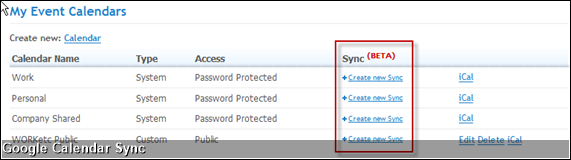
and then...
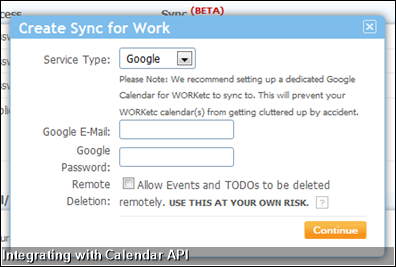
Again, this is a beta so please take some care. I would hate for anyone to miss an important meeting because something didn't work (although I'm assured this just can't happen!)
Subscribe here for more product updates....
or follow us on twitter...
To access this, go to Settings -> Event Calendar Settings, select the calendar you want to sync and then enter your details:
and then...
Again, this is a beta so please take some care. I would hate for anyone to miss an important meeting because something didn't work (although I'm assured this just can't happen!)
Subscribe here for more product updates....
or follow us on twitter...

Product Releases
Big News
Coalface
- Oil makes everything go faster... right?
- Build a better product by getting your feet really dirty (& what is coming next)
- A Getting Things Done (GTD) approach for WORK[etc]
- Welcome to the SSD club, Amazon EC2 (and how SSD's powered a 714% Performance Increase)
- Four Questions that Bring Teams Together
- See all from Coalface
Archive
- 2013 May
- 2013 Apr
- 2013 Mar
- 2013 Jan
- 2012 Oct
- 2012 Oct
- 2012 Sep
- 2012 Aug
- 2012 Jun
- 2012 Jun
- 2012 May
- 2012 Apr
- 2012 Mar
- 2012 Feb
- 2012 Jan
- 2011 Dec
- 2011 Nov
- 2011 Oct
- 2011 Sep
- 2011 Aug
- 2011 Jul
- 2011 Jun
- 2011 May
- 2011 Apr
- 2011 Mar
- 2011 Feb
- 2011 Jan
- 2010 Dec
- 2010 Nov
- 2010 Sep
- 2010 Aug
- 2010 Jul
- 2010 Jun
- 2010 May
- 2010 Apr
- 2010 Mar
- 2010 Jan
- 2009 Oct
- 2009 Sep
- 2009 Jul
- 2009 Jun
- 2009 May
- 2009 Apr
- 2009 Mar
- 2009 Feb
- 2008 Nov
- 2008 Aug
- 2008 Jul
- 2008 Jun
- 2008 May
- 2008 Apr
- 2008 Mar
- 2008 Feb
- 2008 Jan
- 2007 Dec
- 2007 Oct
WORK[etc]
Stay in touch
International
Partners

© Copyright 2005 - 2012 WORKetc Pty Ltd. All Rights Reserved.