- phoneUSA: +1 800-322-7860 (Sales)
- UK: +44 (0)20 3332 0860 (Sales)
- AU: 1300 857 860 (Sales)
- International
WORK[etc] Web App Blog
Get Stuff into WORKetc Faster with Evernote
13
Jun
Jun
I have a lot of ideas ... all the time. The more coffee I drink, the more ideas I have.
And they come at the most inopportune times; In the shower, trying to get off to sleep, waiting for the next wave and again in the shower (that seems to happen a lot).
I also come across a lot of seemingly important information. And again mostly at the most inopportune times; when I’m trying to focus on getting a task done and I stumble across something that could be the magic bullet I've been looking for, but completely irrelevant to right now.
In fact in the back of my mind I always have a feeling I’ve missed something really important. I might be about to start a task and there was a crucial piece of information I know I’ve seen somewhere, but where?
I know I’m not alone in this.
Business owners, entrepreneurs, project leaders, sales people and really anyone involved in running a business face this challenge every day, all the time:
This is where Evernote comes in. Evernote is a tool that is available on every major smart phone, every current web browser and for your Mac or PC. It is now even shipping as standard in many scanners and digital cameras.
The guys at Evernote say it best:
And of course no matter where you captured something, it all syncs back to the single account.
Evernote now also syncs with WORKetc (and vice versa).
That’s right. You can now use your Evernote account to capture “stuff” on the go and sync up to WORKetc.
What's even better is that you can use the Evernote Android and iPhone apps, right now, to push "stuff" into your WORKetc account.
Here’s a few scenarios describing how Evernote + WORKetc combo is so incredibly useful:
How It Works
Turning on Evernote for your WORKetc account is simple; go to Settings -> Manage My Account -> Apps Integration and then hit the Enable button for Evernote. And of course you'll need an Evernote account already.
Now - on the very first sync, WORKetc takes the liberty of putting a note into your Evernote account called "Getting Started: WORKetc Evernote Sync". It is very important that you read this as it describes all the tags you must use in order to ensure a trouble-free syncing experience between the two applications.
Two important things to remember:
And that is pretty much all there is to it. Once you are comfortable punching in #Tags to create WORKetc objects whilst inside of Evernote, you can't really go wrong.
Here's a visual explanation of how it works...
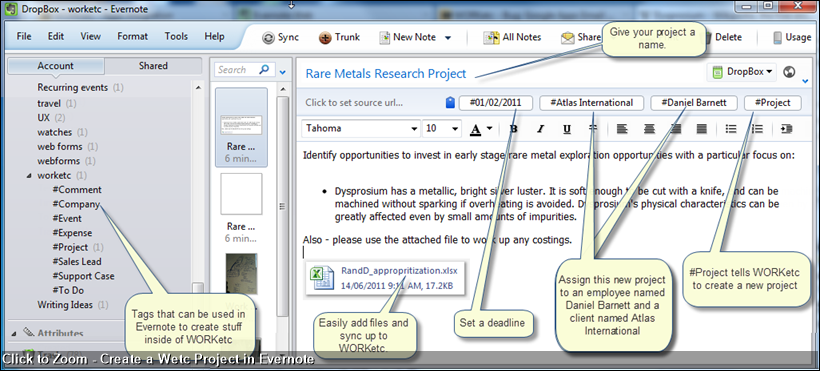
Create a new WORKetc project inside of Evernote:
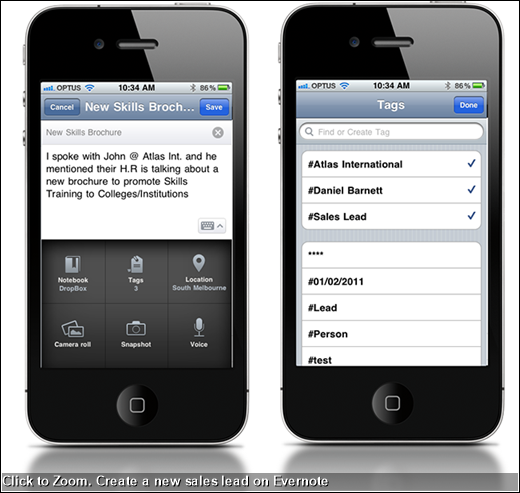
Using the Evernote iPhone App to create a new sales lead:
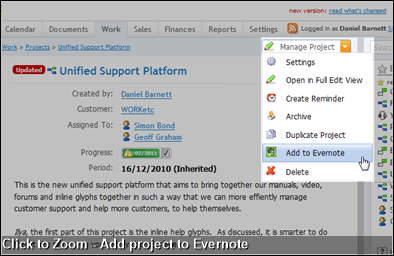
You can also send an existing WORKetc project to Evernote. That project then appears as a Notebook inside of Evernote, to which you can create notes and have them sync back up to that WORKetc project:
And they come at the most inopportune times; In the shower, trying to get off to sleep, waiting for the next wave and again in the shower (that seems to happen a lot).
I also come across a lot of seemingly important information. And again mostly at the most inopportune times; when I’m trying to focus on getting a task done and I stumble across something that could be the magic bullet I've been looking for, but completely irrelevant to right now.
In fact in the back of my mind I always have a feeling I’ve missed something really important. I might be about to start a task and there was a crucial piece of information I know I’ve seen somewhere, but where?
I know I’m not alone in this.
Business owners, entrepreneurs, project leaders, sales people and really anyone involved in running a business face this challenge every day, all the time:
How to capture the important stuff, anywhere, anytime whilst not losing focus.
This is where Evernote comes in. Evernote is a tool that is available on every major smart phone, every current web browser and for your Mac or PC. It is now even shipping as standard in many scanners and digital cameras.
The guys at Evernote say it best:
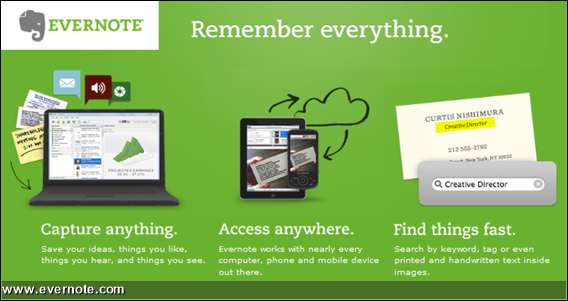
Chances are, if you can see it or think of it, Evernote can help you remember it. Type a text note. Clip a web page. Snap a photo. Grab a screenshot. Evernote will keep it all safe.
And of course no matter where you captured something, it all syncs back to the single account.
Evernote now also syncs with WORKetc (and vice versa).
That’s right. You can now use your Evernote account to capture “stuff” on the go and sync up to WORKetc.
What's even better is that you can use the Evernote Android and iPhone apps, right now, to push "stuff" into your WORKetc account.
Here’s a few scenarios describing how Evernote + WORKetc combo is so incredibly useful:
- Select copy from a web site, clip to Evernote (using the Evernote browser Add-on) and sync up to WORKetc. For example, if you were conducting research as part of a WORKetc project, you would use Evernote to clip text from an online publication and then create as a comment against your project (all from within Evernote).
- Use the Evernote mobile app to snap a picture of a receipt then sync up to WORKetc as an expense attached to a client or a project. For example, lets say you have just finished up a lunch “meeting” with a client. Using the Evernote app you could take a picture of the receipt, create as a note within Evernote using the #WORKetc tags and with the next sync WORKetc will know to create that as expense against your client.
- Capture a new sales opportunity in the Evernote mobile app and have it auto update a contact’s activity history. For example, lets say you are out at a café with the daily newspaper and you’ve read one of your clients is expanding into a new industry. You can quickly create a comment and using the #Client_Name tag, sync the new sales insight up to WORKetc. You could even assign this sales lead to another WORKetc team member using the #Employee_Name tag.
- Use the Evernote mobile app to rapidly create and assign a bunch of ToDos to your team members. For example, lets say you are working on location at a building site and have noticed a number of defects. Using Evernote mobile app you could capture a picture of the defect, write out the suggested remedy, attach to a WORKetc project and assign to your team member with a deadline for completion.
- Using an Evernote plugin called Voice2Note, you can record voice notes or even a meeting, have them tagged and the first 30 seconds translated, then synced up to WORKetc and saved against a project, client or sales lead.
- Create an event (ie meeting) inside of Evernote, complete with date, time, location, agenda and attendees.
How It Works
Turning on Evernote for your WORKetc account is simple; go to Settings -> Manage My Account -> Apps Integration and then hit the Enable button for Evernote. And of course you'll need an Evernote account already.
Now - on the very first sync, WORKetc takes the liberty of putting a note into your Evernote account called "Getting Started: WORKetc Evernote Sync". It is very important that you read this as it describes all the tags you must use in order to ensure a trouble-free syncing experience between the two applications.
Two important things to remember:
1. Always use a #Tags listed under your WORKetc Tags folder to denote the type of thing you want to create and sync to WORKetc. WORKetc will only ever sync Evernote notes that include a #Tag.
This way you get to choose what you share with your WORKetc team and what you want to keep private on Evernote.
2. WORKetc understands three groups of tags it receives from Evernote:
This way you get to choose what you share with your WORKetc team and what you want to keep private on Evernote.
2. WORKetc understands three groups of tags it receives from Evernote:
- Any type of WORKetc activity (ie ToDo) prefaced with a hash tag (#ToDo) will be used by WORKetc to create that activity as a new item inside of WORKetc.
- Any company name, person name or employee name prefaced with a hash tag (ie #John Smith) will be used as the recipient of an activity. For example, create a ToDo (#ToDo) and assign it to the employee John Smith (#John Smith).
- Any date and time prefaced with a hash tag (ie #1-Jan-2011 11:00) will create a deadline (or timestamp) for an activity. For example, create a ToDo (#ToDo), assign it to John Smith (#John Smith) and have it due on the 1st January, 2011 at 11am (#1-Jan-2011 11:00)
And that is pretty much all there is to it. Once you are comfortable punching in #Tags to create WORKetc objects whilst inside of Evernote, you can't really go wrong.
Here's a visual explanation of how it works...
Create a new WORKetc project inside of Evernote:
Using the Evernote iPhone App to create a new sales lead:
You can also send an existing WORKetc project to Evernote. That project then appears as a Notebook inside of Evernote, to which you can create notes and have them sync back up to that WORKetc project:
Coming up...
- Mobile-optimized WORKetc
- Sales & CRM Overview Pt II (Pt 1 is here)
- Recurring Tasks and Support Case Deadlines
- Google Docs Integration

Product Releases
Big News
Coalface
- Oil makes everything go faster... right?
- Build a better product by getting your feet really dirty (& what is coming next)
- A Getting Things Done (GTD) approach for WORK[etc]
- Welcome to the SSD club, Amazon EC2 (and how SSD's powered a 714% Performance Increase)
- Four Questions that Bring Teams Together
- See all from Coalface
Archive
- 2013 May
- 2013 Apr
- 2013 Mar
- 2013 Jan
- 2012 Oct
- 2012 Oct
- 2012 Sep
- 2012 Aug
- 2012 Jun
- 2012 Jun
- 2012 May
- 2012 Apr
- 2012 Mar
- 2012 Feb
- 2012 Jan
- 2011 Dec
- 2011 Nov
- 2011 Oct
- 2011 Sep
- 2011 Aug
- 2011 Jul
- 2011 Jun
- 2011 May
- 2011 Apr
- 2011 Mar
- 2011 Feb
- 2011 Jan
- 2010 Dec
- 2010 Nov
- 2010 Sep
- 2010 Aug
- 2010 Jul
- 2010 Jun
- 2010 May
- 2010 Apr
- 2010 Mar
- 2010 Jan
- 2009 Oct
- 2009 Sep
- 2009 Jul
- 2009 Jun
- 2009 May
- 2009 Apr
- 2009 Mar
- 2009 Feb
- 2008 Nov
- 2008 Aug
- 2008 Jul
- 2008 Jun
- 2008 May
- 2008 Apr
- 2008 Mar
- 2008 Feb
- 2008 Jan
- 2007 Dec
- 2007 Oct
WORK[etc]
Stay in touch
International
Partners

© Copyright 2005 - 2012 WORKetc Pty Ltd. All Rights Reserved.